This pack contains 8 badges and 12 stickers. All badges and stickers and their components are properly distributed and grouped under separate layers with proper layer names. Also they are created using customizable vector shapes which makes scaling, reshaping and modifying them in any direction possible.
Category: graphics
Buy royalty free stock graphics and vectors, icon sets and Photoshop add-ons from GraphicRiver, a huge marketplace of great files.
HAPPY NEW YEAR 2011 (Abstract)
Vector Snowflakes With Seamless Patterns (Decorative)
This is set of 12 snowflake pictograms and 7 seamless winter patterns in PSD vector format. Fully and easily editable – just shape layers, without layer masks or raster layers.
• Organized & layered PSD files
• 12 vector snowflakes in PSD file
• 7 predefined seamless winter patterns in PSD and PNG files
• Fully editable, scalable lossless
• Very easy to change colors, styles or dimensions
• For web or printing purposes
Download Vector Snowflakes With Seamless Patterns (Decorative)
Tabs – Horizontal & Vertical and Tab Menu (Web Elements)
Northern Lights Background (Nature)
Easy to Use Download Button Set+Bonus Web Buttons (Buttons)
When you get this item , hundreds and hundreds of buttons can be designed by just changing the same background.
Easy to Use Download Button Set includes;
Black_and_Gray.psd
Bonus.psd
ColorSet1.psd
ColorSet2.psd
Font used:
http://www.fontsquirrel.com/fonts/Bebas
Download Easy to Use Download Button Set+Bonus Web Buttons (Buttons)
Stylish Download Buttons (Buttons)
3D Valentine Hearts (Objects)
Harlequin (Backgrounds)
Dirt Wall (Backgrounds)
Grunge Wall (Backgrounds)
Under Construction Template (Web Elements)
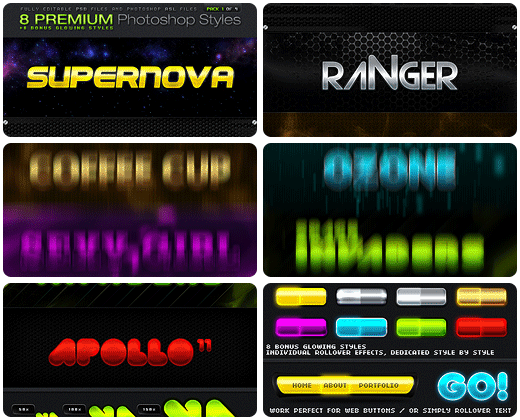
8 PREMIUM Photoshop Styles (Styles)
INSTRUCTIONS :
To add the style pack, make double click in the 8-PREMIUM-Photoshop-Styles-2of4.asl file and go to the “styles palette” in Photoshop.
To apply the styles, just select the layer or text to use and make click one of the 16 styles on the “styles palette”
NOTE :
These styles don’t need multiple layers to work, they work individually.
To Use a Rollover Effects, Just duplicate the layer in question and apply the “rollover style” you wish, for example “Green Hills Rollover”.
This style pack is the second part of 4 packs, the next pack is coming soon! Follow me to get the next updates.

8 Premium Photoshop Styles 1 of 4