Hi all, I require some video editing for a video animation that was created. The first 28 seconds of the animation is good but I require the rest (7 seconds) to be removed. The final frame will need to be a simple jpg image that I will provide… (Budget: $30-250, Jobs: After Effects, Animation, Video Broadcasting)
Author: Blancer
Experienced Craiglist Poster – Long Term Project by OceanAvenue
I am looking for experienced CraigList poster(s) who can posts ads in multiple states/cities across the United States. Ads will be posted in Real Estate sections. They would ideally contain 2 images… (Budget: $750-1500, Jobs: Advertising, Classifieds Posting, Craigslist, Internet Marketing, Marketing)
Need a virtual assistant Available in EST time zone by Success21
Hello, We are looking to hire a virtual assistant on an hourly basis, when you are assigned a particular task. you must provide the total hours required to complete a project before hand, No time-wasters please… (Budget: $30-250, Jobs: Article Submission, Link Building, SEO, Virtual Assistant, Web Search)
Quick Tip: How to Use Cubase’s Quick Controls to Access Massive
Massive comes with a host of parameters that you can control in real time with a MIDI controller or using an automation track within your DAW.
In this tutorial you will learn how to use Cubase’s Quick Controls to assign Massive parameters to your MIDI controller in an uncomplicated way. The advantage of learning to use the Quick Controls for automation is that you can also use them to control the parameters of any other plugin in Cubase.
Step 1
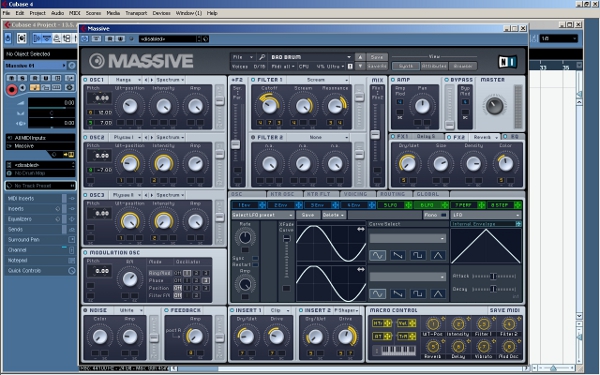
Open a new Cubase project, add an instrument track and load Massive onto it. Then choose a sound preset. For this demonstration we will use the Massive factory preset “Bad Brum”.
Step 2
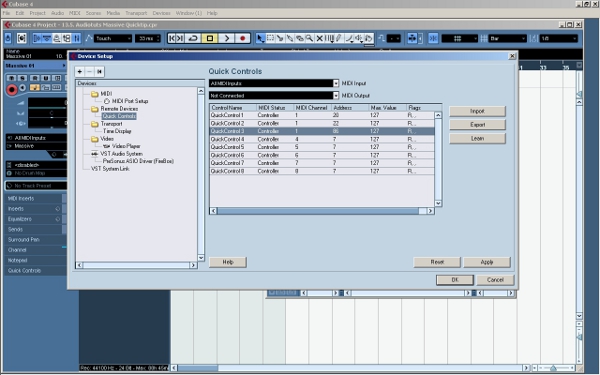
Now we are going to set up the Quick Controls. Go to Devices>Device Setup under the main menu. Under the section “Remote Devices”, you can set up the Quick Controls.
We are going to assign an external MIDI controller fader to Quick Control 1. First move the fader on your external MIDI controller. Then select Quick Control 1 (the first line). Then click on the “Learn” button on the right hand side.
Now repeat the same process with a different MIDI controller fader for line 2 (Quick Control 2). Notice that Cubase automatically detects the MIDI Address of your faders. After doing this, click on “OK” and close the menu.
Step 3
Using your MIDI keyboard or Cubase’s key editor, record some musical MIDI data on the Massive track. The example is a simple slow phrase that we can use to showcase the changing parameters.
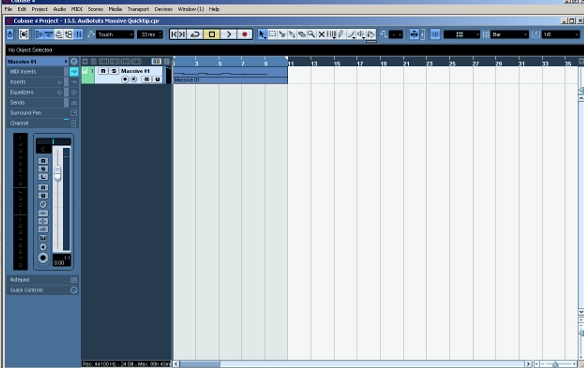
Original phrase without automation.
Step 4
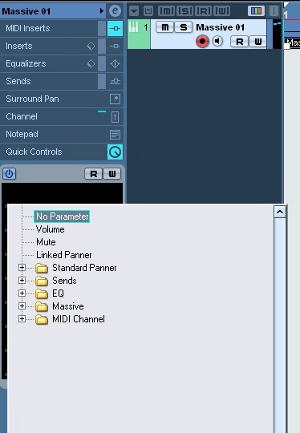
Go to your the track inspector for your Massive track and open the Quick Controls tab. If you click on one of the lines under this tab, a menu with a number of submenus appears. Under a submenu for Massive, you will see a long list of parameters to choose from.
Click on “FILTER1_CUT/PRM” for Quick Control 1 and “FILTER1_RES/PRM” for Quick Control 2. This will allow you to control the cut and resonance parameters of the first filter in Massive.
Step 5
Click W on the Quick Control tab to enable recording MIDI controller data. Then, using the two MIDI controller faders that you assigned to Quick Controls 1 and 2, record some automation for the phrase we’ve already got.
To play this data back, click R on the Quick Controls tab to enable reading during playback.
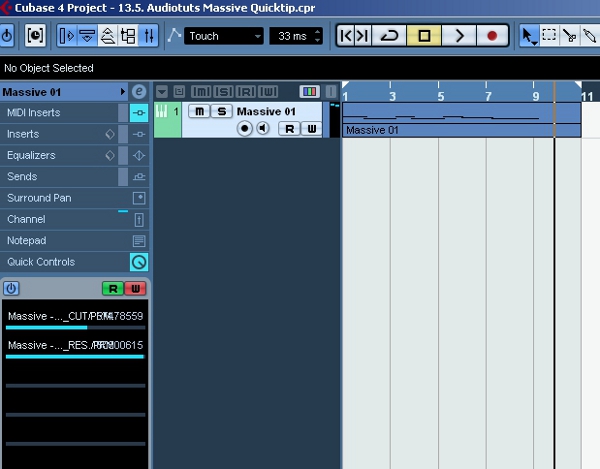
Phrase with automated cut and resonance parameters.
That’s it! As we have seen, this way of using MIDI controller automation in Cubase is very convenient.
It enables you to quickly modify plugin parameters inside the DAW using your external MIDI controller, without having to learn to use each plugin’s different interface.
Professional Press Release Writer require -$5 per 500+ word by contenttrader
I am looking for professional Press release writer who are having min. of 3 years of exp. in writing online press release and know in and out of it. we have regular work for this . we are paying… (Budget: $30-250, Jobs: Articles, Copywriting, Ghostwriting, Publishing, Technical Writing)
Need Ebay Resellers Good Profit by lanfeust
I am in need of a eBay reseller who has high reputation as well as capable of selling on other selling-related sites. I have a supplier of cheap furniture items and I need someone to sell them for me, in return I will offer a good percentage for you to keep on each sale… (Budget: $30-250, Jobs: Advertising, Craigslist, eBay, Marketing, Sales)
SEO – Google by EvaProjects
Hello, We are looking for someone to get our hosting website at the top of Google. We have 4 keywords in mind, but these are subject to change after talking with you to see what is most viable. Must provide proof in pm of previous SEO work… (Budget: $250-750, Jobs: Leads, Link Building, SEM / Adwords, SEO, Website Design)
Video Creation Demo & Editing by stewane
I need someone who can create a product demo video and edit the video – possibly with voice over (English) OR Text. This will be a quality video, HOWEVER, I DO NOT NEED AN ELABORATE PRODUCTION.. You… (Budget: $30-250, Jobs: Video Broadcasting, Video Services)
iPhone App Developers wanted – PLEASE READ DESCRIPTION! by APMC
We are looking for 1-2 highly skilled, full time iPhone Developers. ATTENTION: We will only consider a bid, if the following conditions are met 100%: 1.) The iPhone developer must have programmed minimum 1 iPhone GAME with cool effects himself… (Budget: $750-1500, Jobs: iPad, iPhone)
Magento Google Base product submit with special price. by eddie777
I have 1.4 Magento where all the products being submitted with regular prices instead of special prices. I mapped the attributes but it still not working. I need it fixed. (Budget: $30-250, Jobs: Magento)
CRELOADED 6.15 changes to Internet Secure Response Codes by creloaded
Our site needs 3 things: 1) Implement new changes in Internet Secure response codes. 2) Ensure that orders are not accepted when AVS doesn’t match. 3) Make sure that the Internet Secure module (oscommerce… (Budget: $30-250, Jobs: MySQL, OSCommerce, PHP)
Two Quick Edit Inserts into short video by granite
This is an easy job for someone who knows how to do a basic quick edit to an existing video while preserving the quality of the existing film as much as possible. You must have your own video editing and rendering software… (Budget: $30-250, Jobs: Video Services)
project for usmanqureshi002 by shakirahmed
as discussed (Budget: $30-250, Jobs: Facebook, YouTube)
Project for Olivercd. 2 Original PSD Designs, Re: oc051310 by project100
This project is for OLIVERCD only. Thank you 2 original, different designs, so 2 PSD files will be the final product. Specific details will be given directly, as well as customer’s preferences on colors, layouts, etc… (Budget: $30-250, Jobs: Graphic Design, Photoshop Design, Website Design)
3Step FBML Code For Facebook by Jackhoward2010
I require the 3step FBML code for facebook. This code must : Step 1 – Make them like page to view step 2. Step 2 – Make them Invite All friends, MUST use force add all friends code. Step 3 – View content… (Budget: $250-750, Jobs: Facebook)