Some spiffy cases for your Square credit card reader

As we noted last week, the Square credit card reader is now available in Apple Stores all around the country — you buy the reader for $9.95, but get a $10 credit when you do so, so the only charges are what you rack up when actually accepting credit card payments. As we’ve said before, it’s a pretty easy way to use cards, whether you just need money from a friend or have a small business that only occasionally takes payments.

But that reader is tiny and easily lost, so what’s the best way to keep track of it? A special case, of course. Unpluggd has a few options for keychain cases built specifically to hold that little widget, from $10 up to the excellent case above for $25. Yes, it might seem a little strange to spend that much on a case for something that you essentially got for free. But if it helps you keep track of the reader and have it right there on hand when you need to take a big payment, it’ll be worth it, right?

Some spiffy cases for your Square credit card reader originally appeared on TUAW on Sat, 23 Apr 2011 08:00:00 EST. Please see our terms for use of feeds.

Source | Permalink | Email this | Comments

Preview app in Lion will act as Word, Excel, PowerPoint viewer

Mac OS X’s Preview app has come a long way since its humble beginnings as a PDF viewer. AppleInsider reports that in the latest build of Lion, Preview has received a UI overhaul and added some pretty cool new features.

For example, Preview will act as a Microsoft Word, Excel, and PowerPoint viewer. This is one of the smartest things Apple could have done. How many times have you sent a PowerPoint file to someone only to get an email back saying they didn’t know how to open it (happens all the time with my friend’s grandparents)?

Now when anyone running Mac OS X 10.7 Lion receives an Excel or PowerPoint file, the file will automatically open in Preview if they don’t have Office or iWork installed. Of course, they won’t be able to edit the Microsoft docs in Preview, but they will be able to view them just like they can view PDFs. Word docs can open in Preview as a viewable file too, but by default they will still open in TextEdit as an editable document.

Other additions to Preview include Full Screen mode; monochromatic, square toolbar buttons; a magnifier loupe tool (like the kind you find in Aperture); expanded PDF annotation tools (including filled text and speech and thought bubbles); and the ability to scan your signature in the Preview app so you can use it to digitally sign documents. I don’t know about you, but I always look forward to OS X upgrades not so much for the big features, but for the continued refinements to the OS and its apps as a whole. Judging by the way Lion is shaping up, it won’t disappoint.

Preview app in Lion will act as Word, Excel, PowerPoint viewer originally appeared on TUAW on Sat, 23 Apr 2011 07:00:00 EST. Please see our terms for use of feeds.

Source | Permalink | Email this | Comments

Survey reveals Mac and PC people think differently

Mac and PC adAccording to the results of a massive survey by Hunch.com, Mac people are frequently young, vegetarian city-dwellers who like modern art, liberal politics, and independent films. Meanwhile, Windows supporters tend to be older, more conservative, and more likely to compare talking about computers to “struggling with a foreign language.”

Whether you’re collecting evidence for the Mac vs. Windows debate you have planned for the weekend or preparing for an appearance on Family Feud, Hunch’s results offer some fun and fascinating insights into the tastes and habits of Mac and PC users, from what TV shows they watch to what snacks will best satisfy their afternoon munchies.

Started by Flickr co-founder Caterina Fake, Hunch provides visitors with personalized recommendations for just about everything from books and movies to cars, vacation spots, and colleges. Between March 2009 and April 2011, Hunch asked 388,315 of its visitors about their preferred computing platforms. Among the respondents (typically tech-savvy early adopters who may not represent a true cross section of the general public), 52% identified themselves as PC people while 25% said they were Mac aficionados. The rest declined to answer the question or didn’t consider themselves loyal to any computing platform.

By combining this data with the results of over 80 million other responses to “Teach Hunch About You” questionnaires, Hunch found some interesting correlations between choice of operating system and a variety of other personal preferences. According to the overall results, Mac users tend to be hummus-gobbling vegetarian city-dwellers who enjoy fancy foods and art-house movies. Or perhaps hummus-gobbling vegetarian city-dwellers prefer Macs — correlational data is tricky like that. What do think? Do these results accurately reflect reality? Or do they falsely endorse long-standing stereotypes for Mac and PC fans? Discuss in the comments.

Survey reveals Mac and PC people think differently originally appeared on TUAW on Sat, 23 Apr 2011 03:00:00 EST. Please see our terms for use of feeds.

Source | Permalink | Email this | Comments

White iPhone 4 Coming to Best Buy on April 27th

White iPhone 4 has already made its appearance in UK at a Vodafone retail store, releasing April 27th, and now 9to5mac reports that their sources are pointing to a launch on that same day in the United States. White iPhone 4 will land at BestBuy on April 27th, 9to5mac reports.

Their source at Best Buy sent them the following inventory screenshot which details the April 27th launch date for the White iPhone 4. The screenshot shows AT&T’s GSM model of the White iPhone 4. They also expect the CDMA version from Verizon on the same day, in USA.

Additionally, both 16 GB and 32 GB white are on their way to Best Buy locations across the United States, so those models should arrive by Monday or Tuesday ahead of the Wednesday launch. The screenshot below clearly shows that all retail stores have about ten 16 GB units on order for launch day.

We’ll update you as we know more. Stay Tuned!

You can follow us on Twitter, Google Buzz, Facebook, and Subscribed to RSS Feed to receive latest updates.

Digg Twitter StumbleUpon Facebook Reddit del.icio.us

Type & After Effects Resources

Type in After Effects is a huge topic, touching on basic design, motion design, title design, effects and plug-ins, expressions, scripting, and more. CMG Hidden Gems: Chapter 21 – Textacy, new sampling of After Effects tips from Chris and Trish Meyer, covers Editing Photoshop Text, Presets in Bridge, Randomizing Order, Eases, Centering Text, Per-character 3D. Of course, tutorials and tips on the topic are extensive beyond these little gems or the ones in this week’s Ten Tight Typography Tips. Here’s some additional items for your consideration.
 
If you’re looking for typographic inspiration, there are regular roundups are offered by Motion Design Love in their series Nice Type Tuesday, in the Type Tuesday series by Brad Chmielewski, and at Screenfonts (from The Font Feed), a monthly commentary on the use of fonts in movie poster design, music video and more.
 
There’s also stuff from the Typography Gallery at Motionspire, from Topher Welsh and others at AETuts, and in the feeds of the inspiration sites aggregated by SqueezeMe.TV and the Vimeo Channels NiceType and Kinetic Typography.
 
General advice can be found in a great Type In Motion class resource and tumblr blog offered by Graham Huber. AE-oriented resources can be found in AE Portal posts tagged typetext, 3D text, and title design, for example see Wiggle Transform TextFour techniques for combining fonts + type videos, and Type casting. Plug-ins are too numerous to cover in a basic survey but AE Scripts has tagged its text-oriented scripts for easy access.
 
And of course AE Help offers guidance in Text animation presets (see a gallery or use Bridge to preview) and Examples and resources for text animation, which is chocked full of tips and references.
 
Here’s A Brief History of Title Design from The Art of the Title:


Read More

Can I Just Say That My Wife Is Amazing!

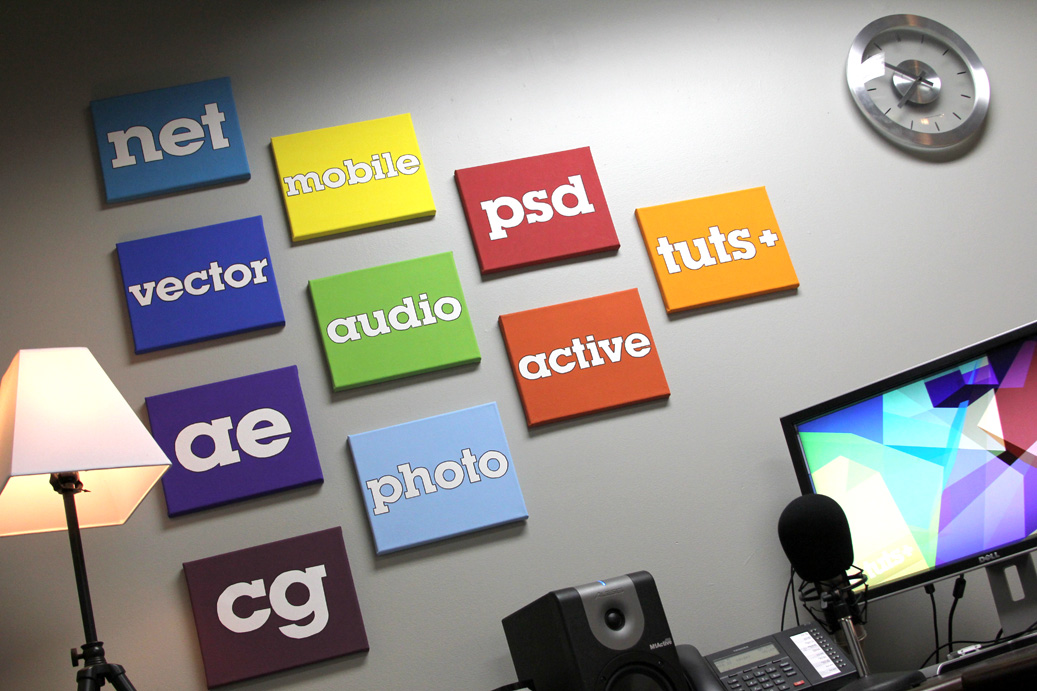
I wanted to create a quick post for a number of reasons… 1st, I wanted to brag on my wife… 2nd, I wanted show of my rockin’ new wall decor… 3rd, since this is a tutorial site, Katie actually created a tutorial on how she made this tuts+ art! Check it out.

Tuts+ Wall Art

So my wife kicked me out of my office tonight to “work on a project”. I returned a few hours later to find this. You can go through the whole tutorial and see more pictures below:

(she left out “Webdesigntuts+” because… well… that’s a huge word to squeeze onto a 10 inch wide canvas.)


Read More

Patrick Chappatte: The Power of Cartoons


Just because you missed that awesome conference, doesn’t mean that you can’t still watch the lectures! This weekend, we feature an inspiring talk by Patrick Chappatte that showcases his experiences of life though comic art. In a series of witty punchlines, Patrick Chappatte makes a poignant case for the power of the humble cartoon. His projects in Lebanon, West Africa and Gaza show how, in the right hands, the pencil can illuminate serious issues and bring the most unlikely people together.

Continue reading “Patrick Chappatte: The Power of Cartoons”

AudioJungle Author: Abir

Reason, KRK monitors, Ozone 4, and playing football. Our sister site AudioJungle is a royalty-free stock audio site that helps musicians earn money. In this interview series you’ll learn about those musicians, their gear, and their AudioJungle experiences. Today we meet Abir (Abir187).

Tell us a bit about yourself. Where are you from, what do you do for a living?

Hi everyone. :) My name’s Abir. I’m 22 years old from the UK, and live in a place called Camden, which is situated in North London. I came out of university last year, where I studied civil engineering – nothing to do with music, haha. :) And at the moment I work in a property estate agent in London, and produce music as a hobby in my spare time.

Which marketplaces do you belong to? What types of files do you sell?

AudioJungle is where I belong. I try to sell a variety of music, to cater for most peoples needs, from hip hop, to electro, to cinematic and corporate music.

How did you get started? Have you had any formal training?

I’m a self-taught musician. Growing up as a teenager in London a few years ago, I managed to get Reason 2.5 when I was 16, and started to play about with the software. At first it seemed a bit daunting as I was a novice, but I kept experimenting, and got myself a MIDI keyboard, and it just went from there really.

Eventually I got the hang of making beats, and as time went by I became more experienced, and this turned into my main hobby. After learning how to use Reason, I moved on to Cubase and a few others, and finally on to Logic, which is my favourite (DAW), and the one which I currently use.

Describe your home workspace.

Well, I’m still saving to get a few things. Equipment doesn’t come cheap I guess. My room is my studio, so space is limited, as I live with family.

I use my MacBook Pro, KRK monitors, audio interface, and an Xboard keyboard. I also have an SE Electronics mic which comes in handy for recording and sampling my own voice etc.

I’m a big fan of Native Instruments. I use KOMPLETE 6 in my productions as well as the KORE 2 hardware/software, just to name a few.

Describe your creative process. What steps do you normally follow to create your files?

I don’t really follow a specific guideline. Usually I can get into my studio and lay a track down quick, and sometimes I need a bit of inspiration to push me in the right direction, so I listen to music from other artists, and it helps.

I like to get a vision before I start, and picture the specific sound I’m going after in my head, and then make it happen in my studio, on the keyboard. A bit like painting a picture.

Sometimes I start with the melody, before the beat or percussion, and vice versa. I tend to build on things and work my way up by layering the instruments and making them fit together. Once I’ve got the basic skeleton of my track, I like to experiment a bit by removing certain instruments from different parts of the track, and just creating variations and eventually sequencing to a full track.

I’m a bit of a perfectionist, so if something doesn’t sound right, or doesn’t sit in the mix in my opinion, then I’ll scrap it and start again.

I also master my own stuff, and use Ozone 4 and T-RackS mastering suites, which I find quite good. I am also learning to improve my mastering skills further.

What is your advice to other authors regarding how to create a successful portfolio?

Quality over quantity. Better to make five great tracks which you have spent your time on and can potentially sell well, than to make ten average / below average tracks which you rushed, and may not even sell!!

There are pros and cons about this, but that’s my opinion. ;)

What do you do to market your files?

I must admit I need to brush up on my marketing skills. I usually promote my stuff on Facebook as everyone tends to be on there, and sometimes Youtube.

My personal website will be up soon…

What are your three favorite files, and why do you like them?

My first fav file is “Jungle Sacrifice“. I did this a while back but still remains my fav, because of the fast paced drums with the voices in the background. I also like this piece as I think it has an eerie feel to it and because it’s quick and reaches a climax fast.

Download audio file (preview.mp3)

My second fav file is “Hip Hop Life” due to the fact that I love hip hop and it is my main genre. When I was producing this I wanted to get that West Coast Gangsta vibe going on , and hence the piano melody, which I think works well with the vocal sample on top in the chorus.

Download audio file (preview.mp3)

My third fav file is “Joker DnB“. I like this because its very fast upbeat, catchy and makes me want to jump up and down. :)

Download audio file (preview.mp3)

Apart from yourself, who is your favorite marketplace author, and why do you like them?

That’s a tough one! There’s soo many, and there’s always new ones. Apart from myself haha. I never intended on saying myself. I have a long way to go. :)

Well, I love the cinematic music from palmtreep. My fav track from him is “Night Stalker” – what a great track. I love the catchy piano melody, and the grittiness of the track when it drops, very original.

Download audio file (preview.mp3)

Uuuummm… Another author I like is Jurgen Beck, who I think is new on AudioJungle and has one item up called “Uncovering Secrets” which I find amazing!! I just love the ambience of the track and the epic cinematic vibe it comes with, very unique.

And finally, I like garethcoker – probably my fav author at the moment. My fav track from him has to be “Firefly in a Fairytale“. When I heard it, I was like this man is a genius. It sent shivers down my spine when I heard it. I expect it to sell a thousand times over!! Keep them coming!!

Download audio file (preview.mp3)

Sorry, I was suppose to pick one author. See how hard it is! :)

What do you do in your spare time?

In my spare time, I like to … make music! lol. :) Ha ha. Spend time with my family, play football, and spend time with my girlfriend.

I’m also a movie lover. :) :) :)

I just wanted to say thanks for giving me the chance to be interviewed. I really appreciate it. :)


Read More

Mmorp Online Basketball Game

This game will be a MMORP online basketball game. It will be a free game,where everyone gets 600 or 900 “hoop points” to build their player when they first join the game. And will get 100 “hoop points” at the end of every season. But each player built can be boosted up to 3 levels each season and that will require members to purchase “hoop points” if they want the best players/teams. We will need for those “hoop points” to be purchased through a merchant and pay pal option.

Members can also purchase their own team and the plan is to have each and every team in a league structure format. I think 30 teams 15 teams per conference on a 82 game schedule to be played every 2 days. How members build their players is how good they will perform. I will explain more when I hire. When members purchase teams they can build stadium and sell tickets,concessions,jerseys etc. to build more revenue.

I would like this game to be a basketball version of http://goallineblitz.com/ (please log in and see how this format is) the players start with a attribute roll and are awarded skill points to build those players. But you have to purchase flex points in order to use the skill points.

I have alot more information,so I will need a worker who has the time and patience to build this game. If you can do this job I will have plenty more work for you in the future.

Writing

Hi,
i have been asked to write a reflective statement for the project done with group.
i wrote a report of 1200 word and i need someone to read it again and to rewrite some of the report to make it clear and nice to read.
please let me know if you can help with it.

Regards,
hilali

Godaddy Linux Vps With Plesk Control Panel Need Fix Apache

i have updated the plesk control panel to the latest version by clicking the update in the admin panel. but after updated, i found the website not open. i checked the service compoment, found the apache is not started. when click start, the error showed :

Error: Unable to make action: Unable to manage service by websrvmng: websrvmng: Service /etc/init.d/httpd failed to start

System error 2: No such file or directory
websrvmng: Service /etc/init.d/httpd failed to start

System error 2: No such file or directory (‘–start’, ‘web’)