Back when using MS Word was an actual skill my high school
computer teacher tasked us to create a resume.

He gave us a list of things to include in our resume:
- Name and contact information
- Career objective
- Education
- Work history
- Skills
- References
We were free to use the fonts, formatting
and other effects we liked on the resume as long as we included everything
in that list. He wanted us to learn the different features of the word
processor, after all.
As a high-schooler with limited work history, the resume references
my classmates and I had were mostly our teachers. It felt silly, but we listed
them anyway—mainly because our computer teacher prompted us to do so.
Back then references were common in resumes, as was the
phrase “References available upon
request.” Now, when I ask recruiters and the career coaches I know about
including references on resumes, the general consensus is a big “NO.”
When to Include References
Some job listings include instructions for applicants to
include references when sending their application. If that’s the case, you
should follow their instructions.
In most cases though, references shouldn’t be included in
your resume because employers won’t need them until they’ve narrowed down the
selection to two or three candidates. So, you’re better off using the extra
space to highlight job-related skills and achievements, as these will be more useful
compared to a bunch of names and numbers at the preliminary stage of the
application.
For most readers, this should answer your question on when
it’s acceptable to include references in a resume. But if you’re still not
sure—or convinced—on what course of action to take, below is a list of pros and
cons on including references so you can decide for yourself.
Pros of including resume
references
- A reference from a well-known
company or manager in your industry may look impressive to potential employers. - Providing references upfront shows employers that you’re confident of getting a positive recommendation from
your previous colleagues and managers. - It gives employers an idea of who
you were accountable to, which is important for senior and executive level
roles, as this allows them to check whether your previous organization’s corporate
structure is similar to theirs.
Disadvantages
of including references on your resume
- It takes up space on your resume,
which could have been allotted for achievements and experience that’ll convince
recruiters of your suitability for a position. - The people you chose as references
may get unexpected calls from recruiters, advertising agents and other third
parties not directly associated with the company you’re applying for. This can
happen if you apply for roles through massive job boards or upload your resume
in online resume banks where people are free to browse resumes. - Reference checks may be done
without your knowledge. If your referee isn’t expecting a call, he or she may
not be prepared to talk about your suitability for the role and your strengths
as a candidate. You may end up getting a mediocre or vague recommendation if
your referee is in a hurry. - You might change your mind about
who to include as a reference later on, and it’ll look suspicious if you say
you want someone else.
How to Add a References to a Resume
Here’s a
complete guide on how to list references on a resume the right way.
1. Choose the Right References
Choose people who can talk at length about your skills and
achievements in your previous job, such as previous managers or teammates with
first-hand knowledge of your abilities at work.
For fresh or recent graduates, you can choose from your
professors, coaches, and advisers. Don’t list your family members though, even
if you helped run the family business.
Ask yourself these
questions when selecting people for your references:
- Which of these people work in the
same industry that I want to work in? - Which of these potential
references has the most knowledge of the skills and experience I possess that’s
also relevant for my target job? - Which of my references has the
most influence within the industry? Who holds the highest position?
When possible, create a diverse group of referees, not just
direct supervisors, to give the background checkers a holistic idea of who you
are as a candidate. Include managers from other departments, clients, liaisons
from other companies, and anyone you reported to that didn’t directly supervise
you.
2. How to Ask Someone to be Your Professional Reference
The more options you’ve got, the easier it’ll be to provide
a targeted list of references during your application process. Don’t just list the
names of everyone you think of though. You might end up getting a so-so
recommendation if someone in your list gets a surprise background check call
about you.
Call or email each potential reference to get their
permission first. Remind them of how you worked together and catch up about
your current career paths, before politely asking if they can serve as your
professional reference.
Frame your request in a way that’ll allow the person to
easily decline your request. For instance, you can say “Would you mind serving as a reference in my current job search? I would
happily serve as your reference as well the next time you need a new job.”
If you need help writing an email that’ll convince someone to be your professional reference, check out the guides for writing email messages below:
 EmailHow to Write an Effective Follow-Up Email After No ResponseLaura Spencer
 EmailHow to Properly Write a Formal Email (That Gets Results)Laura Spencer
3. How to List References on a Resume
Write your references on a separate page attached at the end
of your resume. Here’s all the information you need to include for every person
on your list:
- Complete name
- Job title
- Your previous working relationship
to the reference, including their previous job title if they’ve since been
promoted - Name of employer
- Company address
- Reference’s phone number
- Work email address of reference
If your reference prefers to receive calls only at a certain
time, you should also include that information on your list.
Don’t include your referee’s personal address. Your referee
may not appreciate you sharing all their personal information, and the
background checker isn’t likely to contact them via snail mail anyway.
4. How to Format References on a Resume
Your
references page should be formatted
in the same way as your resume and cover letter. Follow the same style orientation and
formatting as your other job search documents. Here’s a resume references page created from an Envato Elements resume references template:
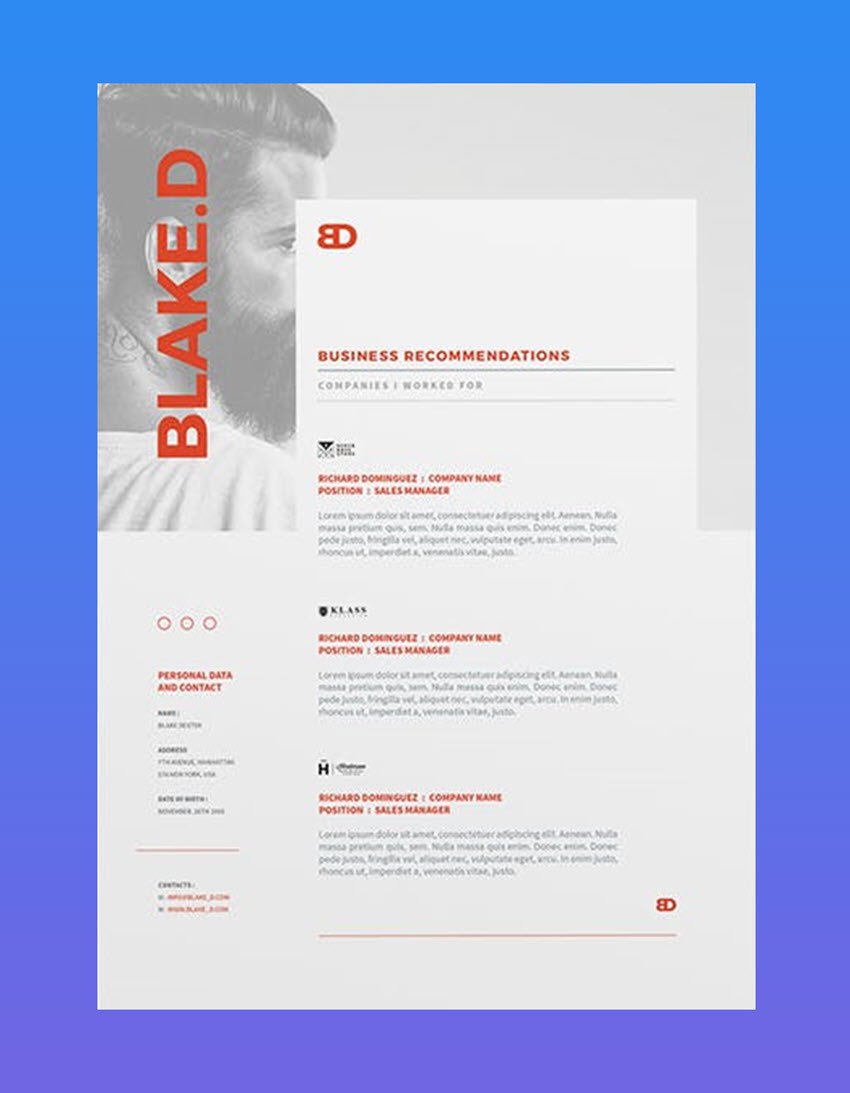
You can find more great resume reference page templates on GraphicRiver. Does your resume, cover letter, and references page have no clear format or design? Check out more easy-to-format design templates here:

5. The Ideal Number of References
Now you might be wondering, how many references on a resume?
Because HR or whoever does the background check will have a
limited time to conduct background checks for each candidate, it’s advisable
that you only put three to five strategically chosen people in your list.
It’s likely that only three people in your list will be
contacted, but it’s better to include five so the person conducting the
background check will have other options in case the first three are
unreachable or unavailable for whatever reason.
Tips on Writing a Resume References Page
Once you’ve gathered your information, you’re ready to start writing. Here’s some tips on how to write a reference page for a resume:
1. Don’t Use the Phrase “References
Available Upon Request”
This is obvious to recruiters and a complete waste of space
in your resume. Use the allotted space for one more achievement-oriented bullet
point or skill instead.
2. List Your Best References at the Top
Not everyone on your references page will be contacted, so
it makes sense to arrange your list to prioritize your “fans” first. Of course, you should make sure that everyone in your
list can give a positive recommendation but if you’re being honest, I’m sure
you can pick which one of your references is most likely to give you an
impressive recommendation.
3. Prepare Your References for the Call
Prepare your contacts for the background check call as soon
as they give you permission to include them as your professional reference.
Give them information about the job you’re applying for to help them, such as
the job’s duties and the experience required. This will help them come up with stories that
connect your previous work and skills to those required in your target job.
Here’s an example email you can send to your references:
“Hi John,
Thank you again for agreeing to be one of my
professional references for my job search. As you know, I’m applying for a [Job
Title] at [Company Name]. Here is the link to their job ad: [URL].Below are the main skills and job responsibilities required
for this position:[Copy and paste the skills and experience required,
based on the job posting].I’ve given your work phone number and email address to
the recruiter, so please expect them to contact you [estimate day given by
recruiter].I really appreciate your help with my job search. If
there’s anything I can do for you in return, please don’t hesitate to ask.Regards,
Kara”
If it’s been a while since you’ve worked with your reference,
you may attach a copy of your resume with the email to remind them of your
work history.
4. Always List New References
Don’t list your boss from eight years ago. The HR manager might
wonder why you don’t have anyone who can give you a positive recommendation
now. Of course, if you’re still in the same company working under the same
person, then listing them is okay. But if you’ve moved on, find someone else to be
your reference.
Make sure the contact information
of all your references are updated, so your background check doesn’t get
delayed because one of your references can’t be reached.
5. Bring a List of References to the Interview
Bring an extra copy of your resume
and a list of your references to the interview, so you can hand it to the
interviewer in case they ask for it. It’s better to have it than to be caught
unprepared.
6. Create a List of Trusted References for Confidential Job Searches
They say the best time to look for a job is when you already
have one, and there’s truth in this because you’re not pressured about where your
next paycheck will come from. Unfortunately, you can’t use your current
co-workers and manager for your references.
This is where having a back-up list of references comes in. These are people you’ve worked with in the recent past, but who’ve got no ties to your
current employer.
Thank Your References
Even if it looks like a solitary task, the job search is a give-and-take process that relies on a number of people. Your
recruiter contacts, your network, previous colleagues, and references all play
a part in this process.
So when you get a job, always send a thank you note to your
references to show how much you appreciate their efforts in helping you land a
job. While they didn’t go to the interview or write your resume for you, they did
have a hand in establishing your credibility with the employers. Very few people
send thank you notes, so it goes a long way in strengthening your professional
relationships.
Why Not Create a Reference Page for Your Resume Today?
Now that you’ve learned some tips about how to make a reference page for a resume, why not get started today? As I’ve shown you above, a resume references template can give you a great head start on a professional-looking document. You can find some eye-catching resume reference page designs on GraphicRiver and Envato Elements.
Editorial Note: This content was originally published on September 7, 2018. We’re sharing it again because our editors have determined that this information is still accurate and relevant.

{excerpt}
Read More