Visitor Demo: http://visitorchat-demo.clientengage.com/contents/demo
Admin Demo: http://visitorchat-demo.clientengage.com/login
The ClientEngage Visitor Chat is a fully-featured real-time chat for your websites. A clear and simple web-based administration allows you to conveniently
chat with your visitors. And best of all: Visitor Chat comes with a Windows-based client out-of-the-box. Without having to visit the Visitor Chat’s
admin-interface you will be notified from your Windows tray and can start chatting straight away!
By including one single snippet of JavaScript, this interactive and engaging Chat can be used on any website – whether you are using WordPress, Joomla! or
plain HTML.
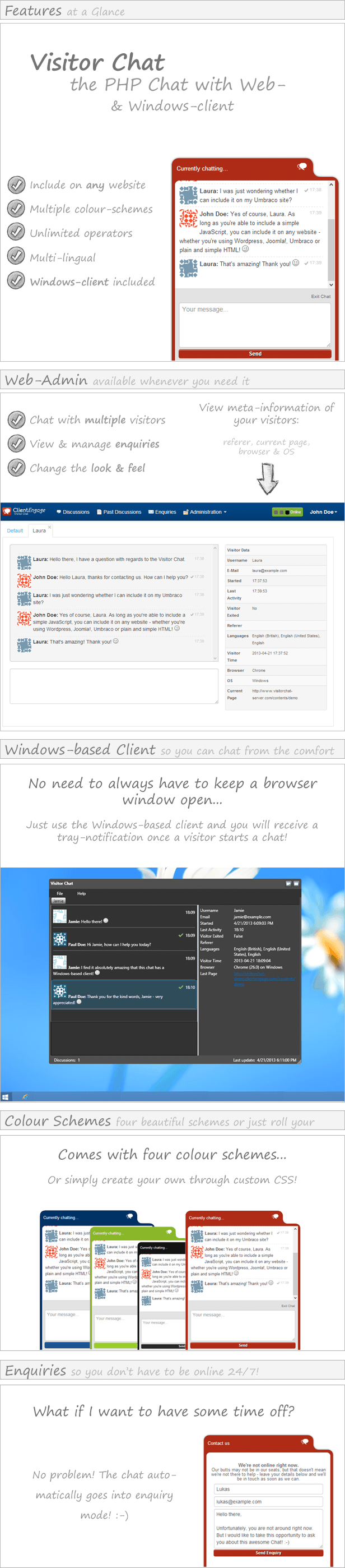
Functionality Overview
|
Fully-Featured Chat for your Website
|
Windows-based client included
|
|
|
Adaptable Templates & Translations
|
Easy Integration & Use
|
Multilingual Interface
ClientEngage Visitor Chat was built with internationalisation in mind: currently, you can select from British and American English as well as German.
System Requirements
In order to be able to use ClientEngage Visitor Chat, you must fulfil the following system requirements:
- Apache 2 HTTP Server
- Preferably with mod_rewrite enabled
- PHP with a version of greater than PHP 5.2.8
- MySQL with a version of greater than MySQL 5 (i.e. with InnoDB support)
- Preferably a subdomain/domain for use with ClientEngage Visitor Voice
- Safe mode: off
- Enough server-resources for the number of concurrent chatters you expect
- Finally, the PHP PDO extensions have to be installed
System requirements of the Windows-based client
- .NET4 Framework (will be installed if not already available)
- Windows XP, Windows Vista, Windows 7, Windows 8
A note on server performance
This chat system employs AJAX technologies and does not rely on WebSockets for its communication. This means that anyone can run Visitor Chat, as long as your server fulfils the requirements outlined below. However, this also means that this system is not intended for heavy-duty use: so don’t build the next Facebook and try to have 10m people use this at once. That being said, on average server-specifications, there is nothing stopping you from having 10-15 concurrent conversations.
A note on chat-styles
The chat looks beautiful across all modern platforms and browsers.
However, the chat-box may look “out of place” if you have CSS styles on your website that affect whole tags (such as “div {margin:50px;}” or “span {padding:50px;}”).
In such cases, you may have to edit the Chat-Style for that particular website to override your styles.
Changelog
22/04/2013:
    - Public release of ClientEngage Visitor Voice v1.0.1
Do you closely work with your clients?
If you are looking for an advanced project management script to manage your client-interactions, then come right this way to have a look at the ClientEngage Project Platform – an advanced PHP project management script.
ClientEngage Project Platform – PHP Project Management
This particular project management script cuts-down on all the bloat that tends to make project management a nuisance. Instead, the ClientEngage Project Platform focuses on the tools you need to really get close to your customers in those crucial stages of your relationship. This will delight your clients – not only with your end-product but the whole lifecycle of getting there. So, if you are looking for project management in PHP, then the ClientEngage Project Platform is for you.
