How to Update iPhone 4 to iOS 4.1 Without Updating Baseband 01.59.00

Posted on September 9th, 2010. Written by Blancer.

In this guide you’ll learn how to update iPhone 4 to iOS 4.1 without updating baseband 01.59.00 which is unlockable.

update iphone 4 to iOS 4.1

Restoring iOS 4.1 on iPhone 4 also updates its baseband 01.59.00 to 2.10.4 which is NOT unlockable at the moment. So, iOS 4.1 is an alarming update for all those depending on unlock. PwnageTool by Dev-Team has the ability to preserve iPhone baseband but unfortunately it’s not yet updated with iOS 4.1 support.

When we talk about the jailbreak community, there’s always an alternate way to get things done. Notcom, the dev behind TinyUmbrella app that let you save shsh blobs for iPhone, iPad and iPod Touch has updated TinyUmbrella to 4.1.3 which lets you update iPhone 4 to iOS 4.1 without updating Baseband (Preserves baseband at 1.59.00 ).  Lets learn how to use TinyUmbrella to update iPhone 4 to iOS 4.1 while preserving baseband 01.59.00.

WARNING: If unlock is the only way for you to use your iPhone as a phone, then we strongly recommend you to avoid iOS 4.1. If you’re brave enough to give it a shot, follow the steps below at your own risk.

THIS GUIDE APPLIES TO IPHONE 4 ONLY.

How to Update iPhone 4 to iOS 4.1 Without Updating Baseband 1.59.00

Step 1

Step 2

  • Run TinyUmbrella
    ***READ THE README TinyUmbrella README NOW Yes. You Read it.
  • Hit the Start TSS Server button

Step 3

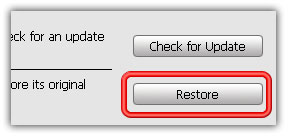
  • Now open the iTunes. Hold down the SHIFT (Windows) or Alt/Option (Mac) key and hit the Restore button on iTunes.
  • Then browse and select your downloaded iOS 4.1 firmware
Step 4

  • Let iTunes error with 1004 error (baseband update failed – we want this :) )

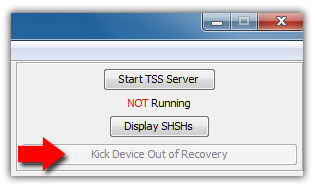
  • No simply hit the Kick Device Out of Recovery button on TinyUmbrella.
That’s it. You have successfully updated iPhone 4 to 4.1 with 1.59.00 baseband. Now wait for a new jailbreak tool to come out and then you’ll be able to jailbreak and then unlock iPhone 4 with UltraSn0w 1.1-1.

Also checkout:

How to: Downgrade iOS 4.1 to iOS 4.x

You can follow us on Twitter, Join us at Facebook, and also Subscribed to RSS Feed to receive latest updates.

Digg
Twitter
StumbleUpon
Facebook
Reddit
del.icio.us

Related posts:

  1. TinyUmbrella 04.02.09: Preserves iPhone 4 Baseband, Supports iTouch 4G iOS 4.1 TinyUmbrella has been updated to version 04.02.09 in anticipation of the imminent release of iOS 4.1. You can download TinyUmbrella 04.02.09 from the links below. Download links and some notable features in TinyUmbrella 04.02.09 after the jump… Baseband Protection – Updating to 4.1 using TinyUmbrella will protect your baseband from...
  2. Unlock iPhone 4 iOS 4.0.1 with UltraSn0w 1.0-1 (Baseband 01.59.00) UltraSn0w 1.0-1 is out to unlock for iPhone 4. This guide is on how to unlock iPhone 4 with UltraSn0w on iOS 4.0.1/4.0 baseband 01.59.00. iPhone 4 unlock instructions can be found below. IMPORTANT Your iPhone 4 must already be jailbroken. (How to: jailbreak iPhone 4 with jailbreakme) UltraSn0w can...
  3. Steve Jobs: ‘Software update coming soon’ for iOS 4 on iPhone 3G One of the many beleaguered iPhone 3G owners who’ve been suffering through poor performance after updating to iOS 4 e-mailed Steve Jobs to ask when Apple will offer a solution. Jobs’s response was brief enough for us to fit the whole thing in our headline: “Software update coming soon.” The...
  4. iOS4 iPhone Update Now Available: How to Download & Install Now that iOS4 is available, here’s a tutorial on how to download the latest iPhone update in a few simple steps: First, download the latest iTunes update 9.2 via the Apple website. Connect your iPhone to your computer via USB and open iTunes. Navigate to the “iPhone” in the left-hand...
  5. Pro HDR gets an update for iPhone and leaps ahead of the pack It must be the week for HDR app updates. Yesterday we reviewed a solid update of TrueHDR, and now we have another terrific update from Pro HDR. Even if you’re not into HDR photography, this is one to check out. High Dynamic Range photography creates an image from multiple exposures...

This entry was posted on Thursday, September 9th, 2010 at 7:02 am and is filed under I-phone. You can follow any responses to this entry through the RSS 2.0 feed. You can leave a response, or trackback from your own site. You can skip to the end and leave a response. Pinging is currently not allowed.

Blancer

Leave a Comment

Please note: comment moderation is enabled and may delay your comment. There is no need to resubmit your comment.

Your Ad Here

Groupon Clone

groupon clone script

Fiverr Clone

fiverr clone script